
AI Automation · 13 min read · By Eravue
Speed to Lead: How Indian Businesses Can Reply to Every Enquiry in Under a Minute
Most enquiries go to whoever replies first. Here's what speed to lead means, how fast is fast enough, and how to automate a WhatsApp reply in under a minute, with real costs.
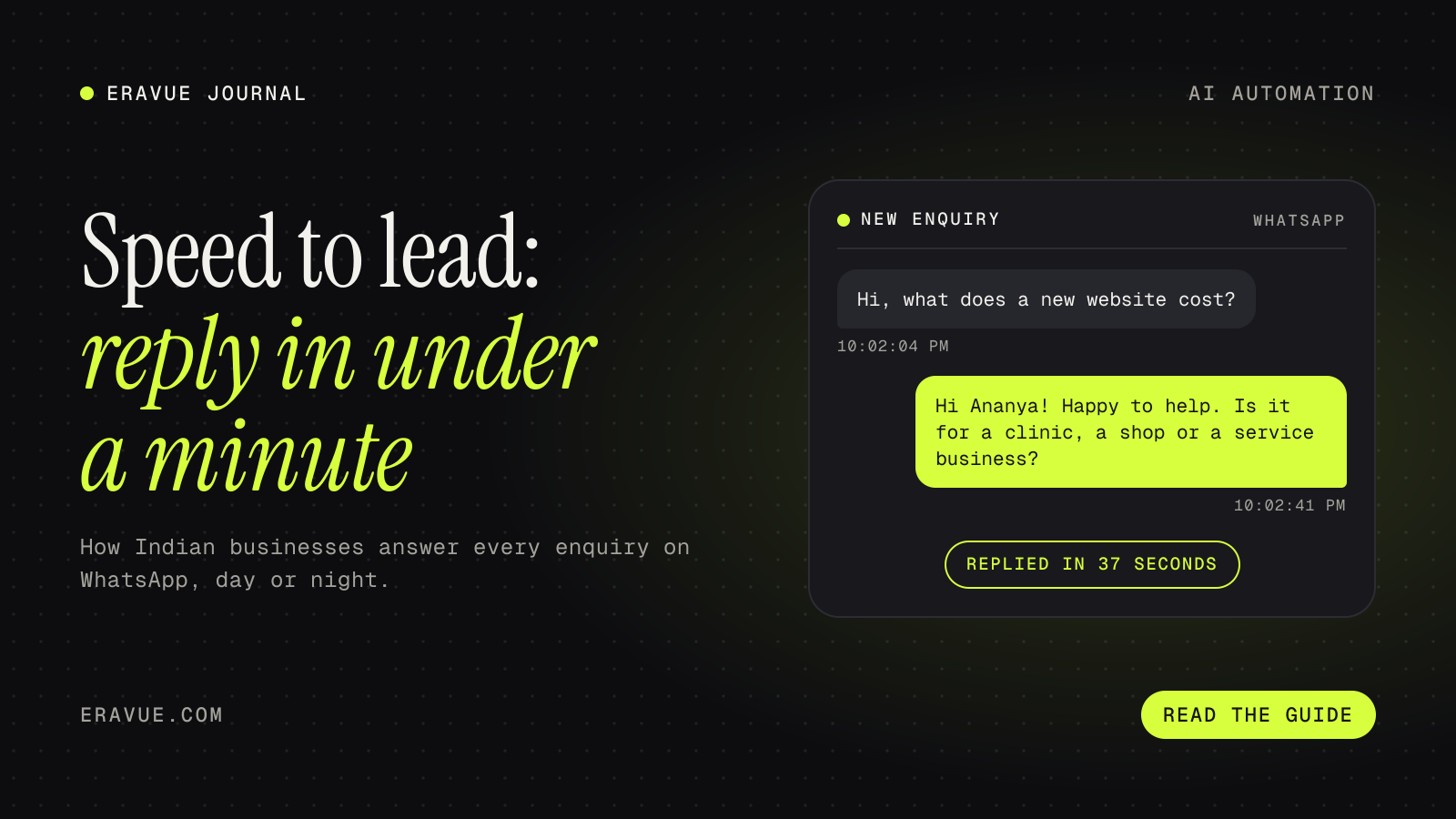
Speed to lead is the time between someone enquiring and your business sending them a real first reply. Aim for under 5 minutes during working hours. With automation you can reply in under 60 seconds at any hour, and in India that reply should go out on WhatsApp, where buyers actually read it.
Most small businesses are nowhere near this. The enquiry lands in an inbox, someone sees it after lunch or the next morning, and by then the buyer has already spoken to two competitors. This guide covers how fast you need to be, where leads leak, and how to set up a reply system that works while you sleep, with real numbers on what it costs.
Key takeaways
Speed to lead is the time from enquiry to first real reply. Track the median, not the average.
Buyers who just enquired are at peak interest. In a Harvard Business Review audit of 2,241 US companies, firms that replied within an hour were nearly 7 times as likely to qualify the lead as firms that waited even one hour longer.
Good: under 5 minutes in working hours. Best: under 60 seconds, 24/7, which in practice means automation.
In India the first reply should be a WhatsApp message, sent automatically from an approved template, followed by 2–3 qualifying questions and an alert to a human.
Running costs are small. On Meta's current India rate card, a utility message costs ₹0.115 and a marketing message ₹0.8631, before GST and your provider's fee.
What is speed to lead?
Speed to lead (also called lead response time) measures how long a new enquiry waits before your business replies with something useful. The clock starts when the form is submitted, the WhatsApp message arrives, the call is missed or the IndiaMART enquiry lands. It stops at the first reply that moves the conversation forward.
Two details make the number honest:
"We'll get back to you" does not count. An autoreply that only confirms receipt doesn't stop the clock. A reply that answers, asks a qualifying question or offers a slot does.
Use the median. One lead answered in 3 days hides behind twenty answered in 2 minutes if you look at averages. The median, and the share of leads answered within 5 minutes, tell you what most buyers experience.
Why replying fast wins more customers
The best-known research is a 2011 Harvard Business Review study by Oldroyd, McElheran and Elkington. They audited 2,241 US companies that generated leads online:
Only 37% replied within an hour.
23% never replied at all.
Firms that contacted a lead within an hour were nearly 7 times as likely to qualify it as firms that waited longer than an hour, and far more likely than firms that waited a day or more.
You'll also see the claim that replying in 5 minutes makes you "100 times more likely" to reach a lead. That figure comes from an older MIT and InsideSales lead response study whose original data isn't publicly available, so treat it as directional rather than exact. The direction is consistent across every study: interest drops fast.
In India the effect is stronger for a simple reason: buyers enquire with several businesses at once. Someone looking for a physiotherapist, a modular kitchen or a CA posts on IndiaMART, fills three website forms and messages two Instagram pages in the same ten minutes. Whoever replies first on WhatsApp, with a useful answer, usually gets the conversation. Everyone else gets "already finalised, thanks."
How fast is fast enough?
First reply within | What it usually means | Who manages it |
|---|---|---|
Under 1 minute | Buyer is still on their phone, still comparing. You set the terms of the conversation. | Automation only |
1–5 minutes | Still warm. Good result for a human team in working hours. | A sales person watching alerts |
5–60 minutes | Buyer has likely contacted competitors. You're one of several. | Typical of busy small teams |
1–24 hours | You're catching up. Many buyers have already booked elsewhere. | Inbox checked a few times a day |
Next day or later | Mostly lost, except for slow, high-ticket B2B purchases. | No process |
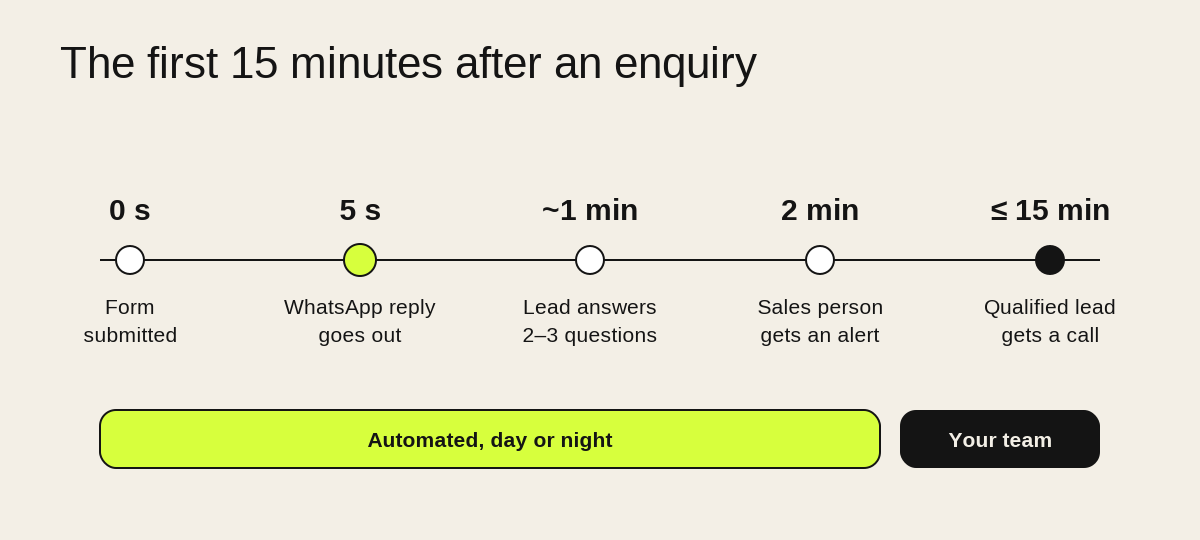
The practical target for a small Indian business: an automated WhatsApp reply in under 60 seconds, and a human follow-up within 15 minutes in working hours for leads that answer the qualifying questions.
Where enquiries leak in a typical Indian business
Before automating, list every place a lead can arrive. Most small businesses have five or more, and nobody owns all of them:
Website contact form that emails an inbox nobody checks after 6 pm.
Instagram DMs and comments ("price?") answered whenever someone opens the app.
Click-to-WhatsApp ads that drop people into a chat with no one on the other end.
IndiaMART, Justdial and other marketplaces, where the same buyer is shown to several sellers.
Google Business Profile calls and messages.
Missed calls during busy hours, at lunch and after closing.
Each source has its own delay. The fix isn't a faster person. It's one system that catches every source the moment it arrives.
How speed-to-lead automation works
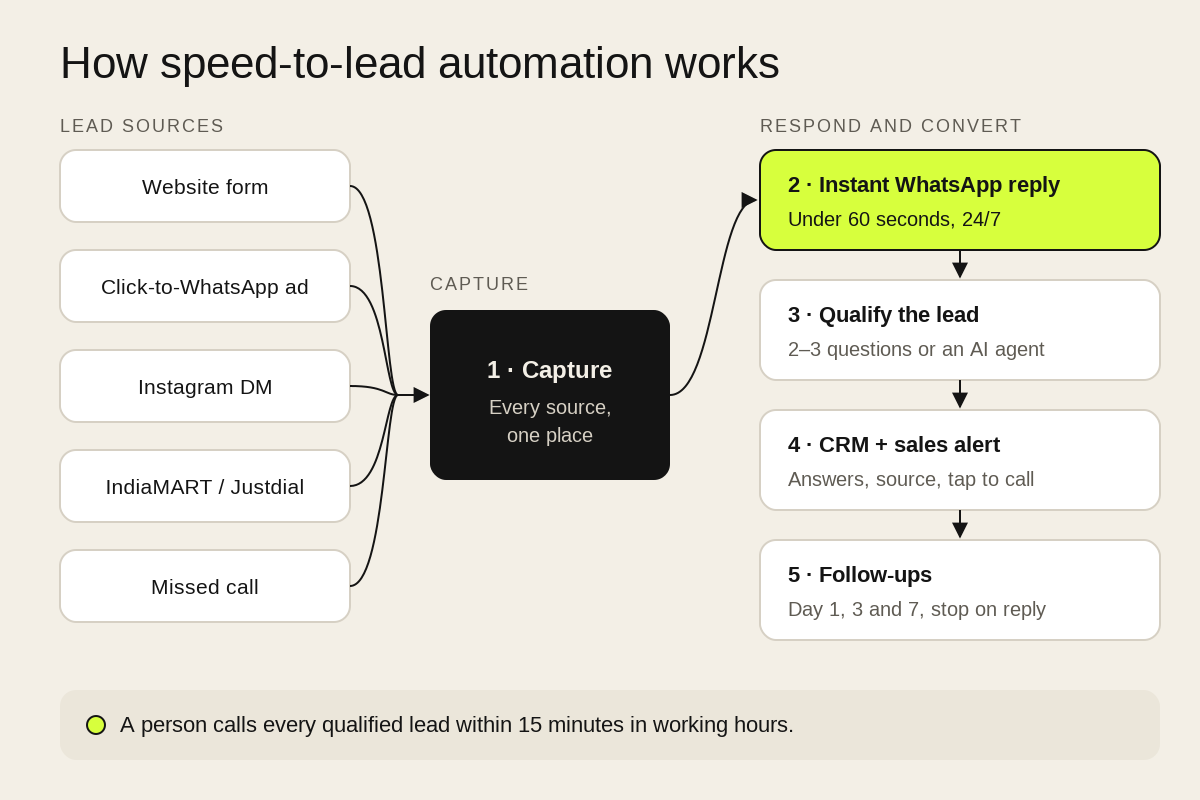
Every good setup has the same five parts:
Capture: every source sends the lead to one place the moment it arrives (webhook, API or email parsing).
Instant reply: a WhatsApp message goes out within seconds, using the person's name and what they asked about.
Qualify: two or three questions, as buttons or a short chat with an AI agent: what they need, budget or size, when they want to start.
Route and alert: the lead lands in your CRM with the answers, and the right person gets a WhatsApp or app alert with a one-tap call button.
Follow up: if the lead goes quiet, timed reminders go out (for example after 1, 3 and 7 days) and stop the moment they reply.
How to set it up, step by step
1. Measure where you are today
Submit an enquiry on your own website, message your own WhatsApp ad and leave a missed call on your number, at 7 pm on a weekday. Note how long each reply takes. Do the same for one competitor. This 20-minute test is usually all the business case you need.
2. Bring every lead source into one place
Connect each source to a CRM or, to start, a shared Google Sheet. Website forms can post straight to a webhook. Tools like n8n, Make or Zapier connect most form builders, Meta lead ads and email inboxes without custom code. Marketplace leads can usually be pulled in through the platform's CRM integration or by parsing their notification emails. If you don't have a CRM yet, our guide on setting up a CRM for a small business covers the basics.
3. Send the first reply on WhatsApp, the right way
This is where most DIY setups break. WhatsApp has two rules you need to design around:
Opt-in. WhatsApp's business policy requires that people agree to hear from you on WhatsApp. Add a clear line and checkbox to your forms ("Get a reply on WhatsApp").
The 24-hour window. You can only send free-form messages within 24 hours of the customer messaging you. A website form doesn't open that window, so the first message to a form lead must be a pre-approved template. Keep it short and specific: "Hi Ananya, thanks for asking about a website redesign. Two quick questions so we send the right quote: …"
Leads from Click-to-WhatsApp ads are easier: the customer messages first, so you can reply in free-form straight away, and Meta doesn't charge for your messages during the free entry point window that opens when you respond.
4. Qualify with two or three questions
Ask only what decides the next step: what they need, rough budget or size, and timeline. Buttons work for simple choices. For open questions ("what's wrong with your current website?"), an AI agent trained on your services, prices and FAQs can answer follow-up questions and collect details in natural language. If you're unsure which you need, see AI chatbot vs AI agent for a business website.
5. Alert a human, with context
Automation should hand over, not hide the lead. Send the assigned person a WhatsApp alert with the lead's name, source, answers and a tap-to-call link. Set a rule: qualified leads get a call within 15 minutes in working hours. If nobody picks it up in 15 minutes, escalate to a second person.
6. Follow up until they reply, then stop
Most deals don't close on the first message. A short sequence (day 1, day 3, day 7) with something useful each time, such as a price range, a relevant example or a booking link, recovers leads who got busy. Stop the sequence as soon as they reply, and always give an easy way to opt out.
7. Don't forget missed calls
For businesses that live on the phone, such as clinics, real estate and home services, missed calls are the biggest leak. Two options: an automatic WhatsApp message after every missed call ("Sorry we missed you, how can we help?"), or an AI voice agent that answers when your team can't, books appointments and logs the call.
What speed-to-lead automation costs in India
There are three parts to the cost.
WhatsApp message fees (Meta). Meta charges per delivered template message. Its rate card for India, effective 1 October 2026, is:
Message type | Typical use in a lead flow | Meta rate (India) |
|---|---|---|
Utility | Confirming the enquiry, sharing the details they asked for, appointment reminders | ₹0.115 per message |
Marketing | Promotional follow-ups, offers, re-engagement | ₹0.8631 per message |
Service | Free-form replies after the customer messages you | First 1,000 per month per number free, then ₹0.115 |
Any type in a free entry point window | Replies to people who came from a Click-to-WhatsApp ad | Free |
Meta decides the category from the template's content, so a "thanks for your enquiry, here are the details you asked for" message is likely to be utility, while a "10% off if you book this week" nudge will be marketing. Your WhatsApp provider will add GST and usually a platform fee or markup.
A worked example: 500 form leads a month, each getting one utility confirmation and two marketing follow-ups, costs about 500 × ₹0.115 + 1,000 × ₹0.8631 = ₹920 a month in Meta fees. Leads who reply open the 24-hour window, and those conversations fall under the 1,000 free service messages.
Tools. A WhatsApp Business API provider, an automation tool (n8n can be self-hosted; Make and Zapier have paid tiers) and a CRM. Many small businesses run this on existing tools plus a WhatsApp provider plan.
Setup. A simple form-to-WhatsApp flow with alerts is a few days of work. Adding an AI agent, CRM integration and marketplace sources takes longer. For typical build ranges, see our breakdown of AI automation costs for small businesses in India.
The maths is simple. If one extra customer a month is worth more than your monthly running cost, the system pays for itself.
What to automate and what to keep human
Automate | Keep human |
|---|---|
The first reply, within seconds, 24/7 | Pricing negotiation and custom quotes |
Collecting basic details (need, budget, timeline) | Calls with qualified, high-value leads |
Answering common questions (timings, location, starting prices) | Complaints, refunds and anything sensitive |
Booking a call or appointment slot | Final decision conversations |
Reminders and follow-ups that stop on reply | Relationship follow-ups with past clients |
Common mistakes
An autoreply that says nothing. "Thanks, we'll contact you soon" is a receipt, not a reply. Ask a question or give a next step.
Email-only replies. Many Indian buyers don't check email for days. Reply where they are.
A bot with no exit. If someone types "call me" or asks something the bot can't answer, it should hand over to a person immediately.
Too many follow-ups. Three useful messages beat eight pushy ones. Pushy templates get blocked and reported, which lowers your number's quality rating with Meta.
No measurement. If you don't track response time per source, you won't notice when a new form or ad campaign quietly stops sending alerts.
How to measure speed to lead
Track these weekly, per lead source:
Median time to first reply (automated) and median time to first human contact
Share of leads replied to within 5 minutes
Contact rate: how many leads you actually spoke to or chatted with
Qualified rate and booking rate
Repeat the 7 pm self-test once a month. Forms break, tokens expire and phone numbers change. The test catches it before your leads do.
FAQ
What is a good speed to lead?
Under 5 minutes in working hours is good. Under 60 seconds at any hour is excellent, and it's only realistic with automation. Anything over an hour means you're usually competing against businesses that already replied.
Is speed to lead the same as lead response time?
Yes. Both mean the time between an enquiry and your first meaningful reply. "Speed to lead" is more common in sales and marketing teams; "lead response time" is the more formal term.
Can I send a WhatsApp message to someone who filled my website form?
Yes, if they opted in to WhatsApp messages and you use a pre-approved template for the first message. Once they reply, you can chat freely for 24 hours from their last message.
Does this work for IndiaMART and Justdial leads?
Yes. Those leads can usually be brought into your CRM or sheet through the platform's integration options or by reading their lead notification emails, and then get the same instant WhatsApp reply as your website leads.
Will automated replies feel robotic to customers?
Only if they're vague. A reply that uses the person's name, mentions exactly what they asked about and asks a sensible next question reads as attentive, not robotic. Most people care that you replied fast and helpfully, not whether a person typed it.
How long does it take to set up?
A basic form-to-WhatsApp reply with alerts can be live in a few days. A full system with an AI agent, CRM, marketplace sources and follow-up sequences usually takes two to four weeks, depending on how many sources you have.
Next step
If enquiries are waiting hours for a reply, that's usually the cheapest growth fix available to you. Our lead generation and instant follow-up service sets up the whole flow: every source captured, a WhatsApp reply in seconds, qualified leads in your CRM and alerts to your team. For more ideas on what else to automate, see these AI workflow automation examples for Indian businesses.
Sources: Harvard Business Review, "The Short Life of Online Sales Leads" (2011) · Meta, Pricing on the WhatsApp Business Platform and its INR rate card effective 1 October 2026 · WhatsApp Business Messaging Policy
- #WhatsApp CRM India
- #AI agent for lead qualification
- #AI automation for leads
- #Speed to lead
- #Lead response time