
AI Automation · 13 min read · By Eravue
Meta Business AI on WhatsApp in India: What's Free, What You Give Up, and When to Build Your Own
Meta's AI agent inside the WhatsApp Business app is free to start, but it has a usage limit and switches off some features. What to check before you turn it on, and when a custom agent makes sense.
Meta Business AI (officially called Meta Business Agent) is an AI assistant built into the WhatsApp Business app that answers customer messages using your catalog, website and past chats. For eligible Indian small businesses it is free to start, but Meta says there is a usage limit, and switching it on turns off some WhatsApp Business features. If you run one WhatsApp number and most questions are about prices, hours and products, it is a sensible first step. If you need an agent that writes leads into your CRM, follows your own rules or works beyond WhatsApp, you will outgrow it.
A note on where this comes from: we have not switched this on for a client. Everything below is taken from Meta's own announcement, WhatsApp help-centre and developer pages, read on 12 November 2026. Where Meta doesn't publish a detail, we say so. Meta changes this product often, so check your app before you decide.
Key takeaways
Business AI (India launch name) and Meta Business Agent (product name) are the same thing: an AI agent that replies to customers in your WhatsApp Business app. You set it up from the Tools tab.
"Free" means free up to a limit. Meta's help page says that if you reach your free limit you can wait for it to refresh or subscribe to a Meta One plan. Meta has not published the number.
Not everyone can see it yet. Meta says it is available to select businesses in limited countries, and there is a waitlist.
Turning it on has side effects: broadcast lists, disappearing messages and greeting and away messages can stop working, and linked devices (such as WhatsApp for Windows) get disconnected.
Chats where it is switched on are collected by Meta to improve its AI, even when you mute the agent.
Choose a custom agent for what it can do (your CRM, your rules, other channels), not to save money per message.
What is Meta Business AI?
Meta announced Business AI on WhatsApp for small businesses in India in May 2026. WhatsApp's help pages and developer docs call the same product Meta Business Agent. It is not the same as the Meta AI business assistant, which helps you with your own tasks, such as searching your chats, rather than replying to customers.
Once it is on, the agent can:
Answer questions about your hours, location, products and services.
Share pricing, discounts, payment and shipping details you have given it.
Recommend products or services.
Ask customers questions and collect details on your behalf.
Book appointments, if you connect a calendar (one calendar account at a time).
It learns from your public profiles, website, catalog, Facebook Page posts, past chats and files from Google Drive. Customers are told in the chat that AI is replying, and you can step in at any point. When you reply manually, the AI stops replying in that chat.
Is Meta Business AI free?
It is free to start, with a limit. India Today reported at the launch in July 2026 that the agent costs nothing to use. Meta's own Meta One help page adds the fine print: access to the agent is limited, and if you reach your free limit on the WhatsApp Business app you can subscribe to a Meta One plan for more access or wait for the free limit to refresh. Meta One is described as "in limited testing", and subscribing to a plan that lists the agent doesn't guarantee you can use it.
Meta hasn't published the size of the free limit or Indian prices for Meta One on the pages we read. Don't plan a business around "free" until you've seen your own usage.
There are also two other ways to get an AI agent on WhatsApp, with very different costs:
Business AI in the WhatsApp Business app | Meta Business Agent on the Business Platform (API) | A custom agent | |
|---|---|---|---|
Who it's for | Small businesses using the app | Larger businesses on the API; Meta calls it an "enterprise AI agent" | Any business that needs its own logic |
Setup | In the app, no code | Developer work through Meta's APIs | Developer work |
Cost | Free up to a limit, then Meta One | About US$2 per million tokens, roughly 4 to 5 US cents per message, no free tier | Build cost, AI model cost and WhatsApp message fees |
Connects to your systems | Google Drive and one calendar | Connectors to your own APIs | Anything with an API |
Who controls the rules | Settings in the app | Settings through the API; Meta sets the handoff triggers | You |
Why don't I see it in my WhatsApp Business app?
Because Meta is rolling it out gradually. Meta's help page says the feature is "only available in limited countries to select businesses". If you don't see an AI agent option under the Tools tab, it isn't available to your number yet.
What Meta's pages tell us:
There is a waitlist. Joining doesn't guarantee access, there is no date, and the app won't notify you.
Language follows your business phone number. Not all languages are supported yet.
Eligibility can change. Meta's developer docs say it can change when you update your business category or when your account standing changes, so a "no" today may become a "yes" later.
Excluded business types aren't listed on the pages we read. Some third-party guides say regulated sectors such as health and finance are excluded. We couldn't confirm that from Meta, so check inside your own app rather than trusting a blog, including this one.
What it does well
For a small business with repeat questions, the strengths are real:
It answers instantly at any hour. That matters more than it sounds. Buyers message several businesses and often go with whoever replies first (see our guide to speed to lead).
You choose when it replies. Options are all new 1-to-1 chats, 1-to-1 chats except saved contacts, only chats that start from your ads, or paused for new chats while it keeps learning.
It hands over to you. An AI handoff list in your Chats tab shows conversations that need you.
You can test it by chatting with it like a customer before it goes live.
A safe way to start: use the "paused but learning" setting first. The agent learns from your replies without messaging customers. When it spots a question it can answer, Meta's help pages say you can tap See AI reply, read the draft, and only then turn on AI replies. A week of reviewing drafts will show you quickly whether it gets your prices, timings and tone right.
What you give up when you turn it on
This is the part most guides skip. According to Meta's help pages:
Some WhatsApp Business features can stop working. Meta says turning on the agent may impede broadcast lists, disappearing messages and greeting and away messages. You can delete the agent to restore them.
Linked devices are disconnected. You can re-link most, but not WhatsApp for Windows, WhatsApp for Android tablets or WhatsApp for WearOS. If your team answers customers from a Windows PC, plan for that.
Meta collects the chats. Messages in chats where the agent is switched on are collected by Meta to improve its AI, even when you mute the agent. That stops when you delete the agent. If you handle health details, ID documents or payment information, decide whether that is acceptable before you switch it on.
It won't jump into a live conversation. If you turn it on in a chat you're already in the middle of, it stays quiet until the chat has been inactive for seven days, unless you restart AI replies.
A manual reply pauses it. When you answer yourself, the AI stops in that chat until you turn it back on.
You don't choose the AI. The controls Meta lists are knowledge, tone, audience and handoff. Picking the underlying model isn't one of them.
Language quality can vary. Meta says it is available in all native languages in India, but the help page says not all languages are supported, and the developer docs say English gives the strongest response quality. Test it with your real customers' messages, including Hinglish.
When a custom agent makes more sense
Meta's agent is built to answer questions. A custom agent is built to do things. Here is where that matters:
You need | Meta's app agent | A custom agent |
|---|---|---|
Every enquiry written into your CRM or sheet, with follow-ups triggered | Not on Meta's list of what the app version does (connectors belong to the API version) | Yes |
Your own rules, such as "never quote below a floor price without a human" or a price calculator | Limited to the knowledge and instructions you give it | Yes, as logic you can test |
The same agent on WhatsApp, your website chat, email and phone calls | Works across Meta's apps | Any channel, including voice |
Choice of AI model, logs of every conversation and handoff rules you set | Managed by Meta | Yours to decide |
If none of these apply to you, don't build anything. Turn on Meta's agent. A custom build is worth it when the agent needs to act on your systems or when WhatsApp is only one of several places customers reach you.
What does it cost to run: Meta's API agent vs a custom agent?
Per message, they are closer than you might expect, so don't pick custom to save money.
Meta's agent on the Business Platform is billed per token: US$2.00 per million tokens. Meta says one message typically uses 20,000 to 25,000 tokens, which works out to roughly 4 to 5 US cents per message. Meta's own examples:
Interaction | Messages | Meta's estimate |
|---|---|---|
Simple enquiry ("At what time do you open?") | 4 | about 16 to 20 US cents |
Complex interaction (step-by-step help) | 10 | about 40 to 50 US cents |
There is no volume discount and no free tier, and these messages are still charged inside the free window that opens when someone messages you from a click-to-WhatsApp ad. At 1,000 simple enquiries a month that is about US$160 to 200, or roughly ₹14,000 to 18,000 at ₹85 to 90 per dollar (our conversion, not Meta's).
A custom agent on the normal WhatsApp Business API sends its replies as ordinary service messages. Meta gives every business number 1,000 free service messages a month, with no roll-over. After that, the INR rate card effective 1 October 2026 lists service messages at ₹0.115 each, before GST. On top of that you pay for the AI model, hosting and the build itself.
Meta's pricing page includes its own estimate that a high-complexity third-party AI model costs about 9 US cents per reply, against 4 to 5 cents for its own agent. That is Meta's comparison of its own product, not a quote, and model cost depends heavily on the model, the length of your prompts and how much you cache. For a rough sense of build costs, see our breakdown of AI automation costs for small businesses in India.
How to decide: a quick checklist
Start with Meta Business AI if:
You have one WhatsApp number and a small team.
Most questions are about prices, hours, products or bookings.
You are comfortable with Meta using those chats to improve its AI.
You don't need leads to land in a CRM automatically.
Look at a custom agent if:
You need every lead qualified and logged in your CRM or sheet.
Replies depend on your own rules, stock, schedules or quotes.
Customers reach you on more than WhatsApp, including calls.
You work in a sector where Meta's agent isn't available to you or where you can't share chats with Meta.
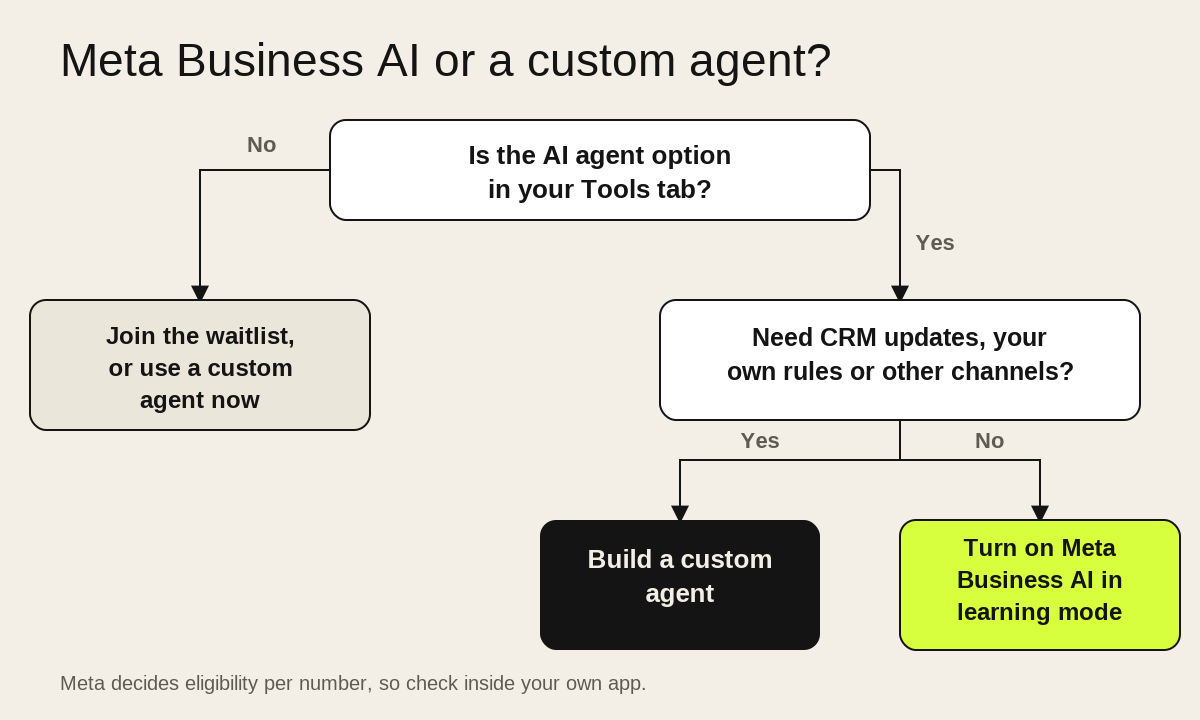
A simple rollout, whichever you choose:
Check Tools in your WhatsApp Business app for the AI agent option, or join the waitlist.
Add your website, catalog and price list, so it learns from them instead of guessing.
Run it in "paused but learning" mode for a week and review the See AI reply drafts.
Switch on replies for chats from your ads first, or for non-contacts, before opening it to everyone.
Track how fast first replies go out and how many chats end up on the handoff list. If the handoff list is long, the agent doesn't know enough yet.
FAQ
Is Meta Business AI free in India?
It is free to start, with a usage limit that Meta hasn't published. When you hit the limit you can wait for it to refresh or subscribe to a Meta One plan, which Meta describes as being in limited testing. The API version for larger businesses is billed per token, at roughly 4 to 5 US cents per message.
Can I use ChatGPT on WhatsApp Business instead?
Meta changed its WhatsApp Business terms, effective 15 January 2026, to bar AI providers from distributing general-purpose assistants (a ChatGPT-style bot that answers anything) through the platform, as TechCrunch reported. A bot built to answer your own customers' questions about your business is a different thing, and that is the use Meta's agent is built for. Read the current WhatsApp Business terms before building on the API.
Does it reply in Hindi?
Meta's India announcement says it is available in all native languages in India. The WhatsApp help page says not all languages are supported yet and that the language follows your business phone number, and Meta's developer docs say English gives the best response quality. Test it with real Hindi and Hinglish enquiries before trusting it.
Can I stop it replying to some customers?
Yes. You can limit it to certain chats, tap Respond manually in a chat, remove it from an individual chat, pause it, or delete it. Replying yourself pauses it in that chat.
Will customers know they're talking to AI?
Yes. Meta says customers are told the first time they chat with a business that has AI connected, and they can ask to talk to your team.
Next step
If Meta's agent covers your needs, switch it on and spend your time on the replies that matter. If you need an agent that qualifies enquiries, writes them into your CRM, follows your pricing rules and hands over to your team with full context, that is what our AI customer support agents do. If slow replies are your biggest problem, start with the lead generation and instant follow-up service. For more ideas on what else to automate, see AI workflow automation examples for Indian businesses, or how an AI chatbot differs from an AI agent.
Sources (read 12 November 2026): Meta India newsroom, Business AI on WhatsApp for small businesses in India · WhatsApp Help Center: About using Meta Business Agent, How to set up, About using Meta Business Agent with Meta One, Connect a calendar, AI handoff list · Meta Business Agent capabilities and Agent eligibility · Pricing on the WhatsApp Business Platform · India Today, 8 July 2026
- #Meta Business AI
- #WhatsApp AI agent
- #WhatsApp Business app
- #AI customer support agents
- #AI chatbot for small business