
AI Automation · 12 min read · By Eravue
WhatsApp AI Agent Human Handoff: When the Bot Should Step Aside (and the Rules to Set)
A WhatsApp AI agent should hand over the moment a customer asks for a person, sounds upset, or the answer involves money, identity or a promise. How Meta's own agent hands over, the rules to copy, and the 24-hour window trap.
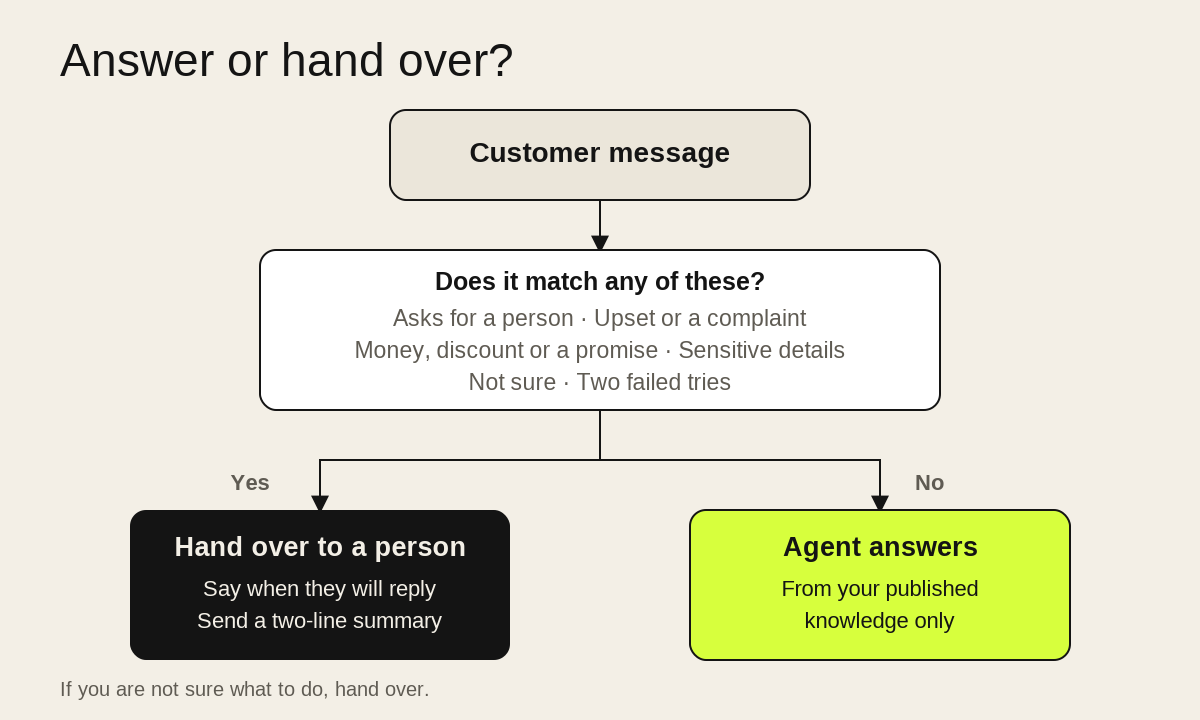
A WhatsApp AI agent should hand the chat to a person in five situations: the customer asks for one, the customer is upset, the agent isn't sure of the answer, the request involves money or a promise, or the agent has failed to help twice. Everything else it can handle. The handoff itself matters as much as the trigger: the customer should be told what happens next, and your team should see the whole conversation, so nobody has to ask the question again.
A note on where this comes from: we haven't run a handoff for a client yet, so the rules below are our recommended defaults, not results. The facts about how Meta's agent behaves come from WhatsApp's help pages and Meta's developer documentation, read on 16 November 2026.
Key takeaways
Hand over early, not late. Letting a bot struggle through a third wrong answer costs more trust than a human reply that arrives a little later.
Use a confidence line, not a timer. The agent should stop when it is unsure about what the customer wants, the amount of money involved, or who the customer is.
Meta's in-app agent shows chats that need you in an AI handoff list and pauses itself when you reply manually. Meta's API version decides its own handoff triggers, which you can't configure.
A custom agent lets you write the rules and pass your team a short summary, which is where most of the value is.
On the WhatsApp Business API, the 24-hour window applies to your human too. If the customer last wrote more than 24 hours ago, you can only send a pre-approved template message.
Measure three numbers: how many chats are handed over, how long a customer waits for a person, and how many customers have to repeat themselves.
When should a WhatsApp AI agent hand over to a human?
Hand over when the cost of a wrong answer is higher than the cost of a short wait. These are the triggers we'd set for a small business, with what the agent should do in each case:
Trigger | Example message | What the agent does |
|---|---|---|
The customer asks for a person | "Can I talk to someone?" | Hands over at once, without asking "can I help first?" |
The customer is upset | "This is the third time I'm asking. Refund me." | Apologises once, hands over, doesn't try to talk them round |
The agent isn't sure | A question that isn't in its knowledge | Says it will check with the team, hands over |
Money, refunds or discounts | "Can you do ₹40,000 if I pay today?" | Hands over; a person agrees any price or exception |
A promise on time or quality | "Can you have this ready by 8 AM tomorrow?" | Hands over; the agent must not commit for you |
Sensitive details | Card numbers, ID documents, medical details | Asks the customer not to share them in chat, hands over |
Two failed attempts | The customer rephrases the same question twice | Hands over before the third try |
Most handoff guides, including the ones that currently rank for this topic, agree on the first few rows. The less-discussed rows are the ones about promises: an agent that says "yes, we can deliver tomorrow" has made a commitment on your behalf that nobody approved.
What should never trigger a handoff?
Routine questions with a clear answer in your knowledge should stay with the agent. If every chat ends up with a human, you have a very expensive auto-reply. Leave these with the agent:
Opening hours, address, directions and parking.
Price lists and package contents you've published.
Availability checks and booking slots, if the agent can see your calendar.
Order or enquiry status, if it is connected to your system.
"What do I need to bring?" or "How long does it take?" questions you've answered a hundred times.
If more than about one in three chats lands on the handoff list, don't loosen the rules. Look at what the agent was asked and add the missing answers to its knowledge.
What a good handoff rule set looks like
Write the rules in plain words and keep them short. Here is a version you can adapt for a clinic, salon, coaching institute or local service business. Paste it into the instructions of whatever agent you use, and edit the examples.
Hand the chat to a person immediately if the customer:
1. Asks for a person, a call, or the owner.
2. Sounds frustrated, or mentions a complaint, refund or cancellation.
3. Asks for a price outside our published list, or a discount.
4. Asks for something by a specific time that we haven't confirmed.
5. Shares card numbers, ID documents or medical details.
6. Asks the same thing twice because the first answer didn't help.

When you hand over:
- Tell the customer a person will reply, and when (our hours: ...).
- Don't say sorry more than once, and don't promise anything.
- Send the team a two-line summary: who they are, what they want.

If you are not sure what to do, hand over.
The last line matters most. It turns "I'm not sure" into a safe exit rather than a guess.
How does handoff work in Meta's own WhatsApp agent?
In the WhatsApp Business app, you take over by replying, and Meta's agent keeps a list of chats that need you. According to WhatsApp's help pages (Meta Business Agent, also launched in India as Business AI):
AI handoff list. In your Chats tab, tap AI handoff to see conversations where the agent decided you should step in. Tap a chat to reply manually. If the list is empty, nothing needs you right now.
A manual reply pauses the agent in that chat. You can also tap Respond manually inside a chat where the agent is replying.
You choose when a chat leaves the list. The default is immediately after you reply. The other option is 24 hours after you reply. Chats that have been inactive for seven days drop off the list but stay in your Chats tab.
Learning mode lets you review before it speaks. In a chat where the agent is only learning, you can tap See AI reply to read a draft and then choose whether to send it. That is a good way to check its judgement before it handles anything alone. Our guide to Meta Business AI covers setup and the trade-offs.
What the app version doesn't give you is a say in why it hands over. For that, you need either Meta's API agent or your own.
How does handoff work when you use the API?
On the WhatsApp Business Platform, you can follow the agent's conversations, take control, and hand control back. Meta's developer documentation for the API version of Meta Business Agent describes this:
The agent starts a handoff by itself when it detects low confidence, an integrity violation, or a customer asking for a human. Meta says you don't configure these triggers.
Your app follows the conversation through standby webhooks, so your team can see the whole chat before it takes over.
You can set your own handoff message in Agent Settings, which is sent to the customer just before the handoff, in place of the default text.
Thread Control decides who answers. Your system takes control by sending a message, and when it's finished it releases control and the agent resumes.
The point to take from this is that Meta's agent decides when to hand over, and you decide what happens after. If your rules include business logic ("hand over any quote above ₹25,000"), you need an agent whose rules you control. That is one of the reasons we'd build a custom agent for a business with pricing rules, rather than rely on a general one.
What should the customer see when the bot hands over?
A handoff message should say three things: a person will reply, roughly when, and that they don't need to repeat themselves. Two examples you can adapt:
Thanks for waiting. I've passed this to our team so you don't have to explain it again. Someone will reply here by 10 AM tomorrow.
This one needs a person. I've shared your details with the team. They're online 9 AM to 7 PM, Monday to Saturday, and will message you in this chat.
Avoid "Sorry, I didn't understand" as a handoff line. It sounds like failure rather than a decision.
What should your team see?
Give your team a two-line summary and the full chat. A summary like this saves the customer from repeating themselves:
Priya, enquired about a 6-month coaching batch.
Wants the fee for two students and a start date; asked for a discount. Not answered.
The summary should hold the name, the request, what the agent already answered, and what is still open. Keep the chat history alongside it. If your team can't see what the bot already said, they will ask the same questions again, and the customer will notice.
Why does the 24-hour window matter for handoff?
On the WhatsApp Business API, you can only send a free-form reply within 24 hours of the customer's last message. Meta's developer documentation says a 24-hour "customer service window" starts when a customer messages or calls you, and restarts every time they message again. When the window closes, you can only send a pre-approved template message.
That has two consequences for handoff:
An after-hours handoff can go stale. If a customer writes at 9 PM, the bot hands over, and your team replies at 11 AM the next day, the window is still open (14 hours). But if your team replies two days later, the human can only send a template to restart the chat.
Your handoff message should promise a time inside the window. "We'll reply by 10 AM" is safe. "Someone will call you this week" isn't a reply you can follow up on in chat.
This rule comes from Meta's WhatsApp Business API documentation, which is what custom agents and Meta's API agent use. We haven't checked how it applies inside the free Business app, so don't assume it carries over.
How do you know if your handoff is working?
Track three numbers each week. You don't need a dashboard to start; a sheet is enough.
Number | What it tells you | A worry sign |
|---|---|---|
Share of chats handed over | Whether the agent knows enough | More than about 1 in 3 |
Time from handoff to a human reply | Whether customers are being left waiting | Longer than the time you promised in the message |
Chats where the customer repeated themselves | Whether the summary and chat history are reaching your team | Any |
Read ten handed-over chats every week for the first month. You will quickly see which answers are missing from the agent's knowledge and which triggers are too jumpy or too slow.
Common handoff mistakes
Making the customer ask twice. "Do you want me to try first?" in reply to "I want a person" is the fastest way to lose someone.
Handing over with no context. The human replies "How can I help?" to a customer who has just explained everything.
Letting the bot agree to prices or dates. Pricing and delivery promises belong to a person.
Never handing over. If a bot can't say "I don't know", it will eventually invent something. Make "I'm not sure" an allowed answer.
Handing over to nobody. If no one is watching the handoff list after hours, say so in the handoff message and give a time. We cover that case in more detail in our guide to replying to enquiries in under a minute.
FAQ
When should an AI chatbot transfer to a human agent?
When the customer asks for a person, sounds upset, asks about refunds, discounts or other money decisions, asks for a promise on time or quality, shares sensitive details, or has had two unhelpful answers in a row. Hand over whenever the agent is unsure.
Can I set my own handoff rules on Meta's WhatsApp agent?
In the WhatsApp Business app, you control when the agent replies (for example, all new chats or only chats from ads) and how long a chat stays on your handoff list. Meta's documentation for the API agent says the handoff triggers, such as low confidence or a customer asking for a human, are not configurable. If you need your own rules, you need a custom agent.
What happens to the AI when I reply manually?
In the WhatsApp Business app, Meta says a manual reply pauses the agent in that chat. With the API version, your system takes control by sending a message and releases control when finished, after which the agent resumes.
Should the AI tell customers it is handing over?
Yes. Say that a person will reply, and roughly when. Customers handle a short wait much better than silence or a sudden change of tone.
How fast should a human reply after a handoff?
As fast as your handoff message promised, and no later. If the team can't reply for hours, say when in the message. On the WhatsApp API, remember the 24-hour window: after it closes you can only send a template message.
Do I need a custom agent for handoff?
Not always. If you run one WhatsApp number and mostly answer simple questions, Meta's in-app agent with its AI handoff list may be enough. A custom agent makes sense when you need rules based on price, customer type or your CRM data, or summaries sent to your team.
Next step
If you want a WhatsApp agent that hands over exactly when you say, with a summary your team can act on, that is what our AI customer support agents are built for. If slow replies are what's costing you enquiries, start with instant follow-up and lead capture. To talk it through, book a free 30-minute call. For a broader view of where bots fit, read AI chatbot vs AI agent: which should your website use.
Sources (read 16 November 2026): WhatsApp Help Center: About Meta Business Agent behaviors in chats, About using the AI handoff list · Meta for Developers: Meta Business Agent capabilities (updated 26 October 2026), Service messages and customer service windows (updated 4 November 2026)
- #Meta Business AI
- #WhatsApp AI agent
- #AI customer support agents
- #AI chatbot for small business
- #AI human handoff